The globe spins, the music builds, and then your Ethnicity Estimate appears. For the first time, you can see which ethnicities and regions are reflected in your DNA. It is an exciting moment, but it may also leave you wondering: What do I do with all this information?
Your DNA results can do much more than provide an intriguing look at your origins. They can help you find relatives, investigate unfamiliar branches of your family, and uncover clues that move your family history research forward.
The best place to begin depends on what you want to learn. This guide walks you through the main ways to use your DNA test results and the MyHeritage features that can help you along the way.
Key takeaways on using your MyHeritage DNA results
- Explore your Ethnicity Estimate and Genetic Groups for clues about your ancestral origins.
- Review your closest DNA Matches first and use family trees, shared surnames, shared places, and other clues to investigate possible connections.
- Organize useful matches with labels so you can return to them as your research progresses.
- Use tools such as Theory of Family Relativity™, cM Explainer™, AutoClusters, and the Chromosome Browser to examine possible relationships.
- Compare genetic clues with your family tree and historical records before drawing conclusions.
- Explore Ancient Origins, Y-DNA results, and DNA Traits for additional insights beyond recent family history.
Explore where your ancestors may have come from
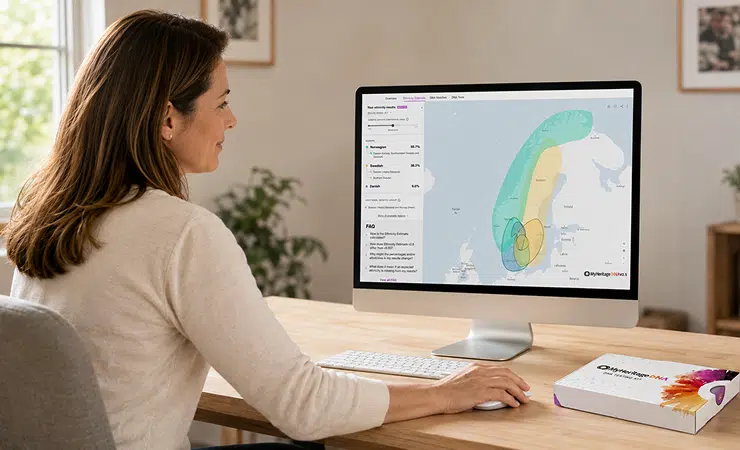
Your Ethnicity Estimate is usually the first part of your results you’ll see. It provides a percentage breakdown of your estimated ethnic origins across 79 ethnicities.
Start by selecting each ethnicity in your results. The interactive map highlights the regions associated with it, allowing you to examine your results one area at a time. Each ethnicity includes a description of its origins, history, and culture.
Keep in mind that an Ethnicity Estimate is exactly that: an estimate. It can offer useful clues about your origins, but it does not identify specific ancestors or prove that a particular person came from a given population. MyHeritage updates ethnicity estimates periodically as the science, algorithms, and reference populations improve, so your results may change over time.
Investigate your Genetic Groups
Genetic Groups can narrow the geographic focus considerably. They identify populations connected to specific regions and, in some cases, individual countries, provinces, counties, or cities. Your Genetic Groups generally appear beneath the relevant ethnicities and are also marked on the map.
Select a Genetic Group to learn more about the population and the places associated with it. You can also explore a timeline heatmap showing how the group’s geographic concentration changed over time.
This may give you a more practical research lead than a broad ethnicity percentage. For example, a Genetic Group associated with a particular region could point you toward local archives, immigration collections, or branches of your family tree that deserve another look.
You can also display events from your family tree on the Ethnicity Estimate map. Comparing documented birth and death locations with your Genetic Groups may help you identify areas where the genetic and genealogical evidence align.
Find relatives and investigate how you are connected
Your DNA Matches are people who share segments of DNA with you, indicating that you may have inherited DNA from one or more common ancestors.

Your matches are generally sorted with the most relevant matches first. Rather than trying to work through the entire list, begin with the closest unfamiliar matches. Close matches are often easier to place in your family tree and can provide context that helps you understand more distant ones.
Each match card shows information such as the estimated relationship, the amount of shared DNA, the number of shared segments, and the size of the largest shared segment. It may also display a Theory of Family Relativity™, which suggests a possible path connecting you and the match through family trees and historical records.
Select “Review DNA Match” to investigate the connection in greater depth. Depending on the information available, you may find:
- A Theory of Family Relativity™
- Possible relationships suggested by cM Explainer™
- Shared ancestral surnames
- Shared ancestral places
- Shared DNA Matches
- Smart Matches™ between your family trees
- The match’s family tree
- Shared DNA segments in the Chromosome Browser
No single clue necessarily establishes how you are related. Look for several details that support the same possibility. A shared surname, for example, becomes much more useful when it appears in both family trees in the same location and during the same period.
Explore a Theory of Family Relativity™
If a Theory of Family Relativity™ appears, review the proposed relationship path to see how you and the DNA Match may be connected. The feature draws on family trees, historical records, and other matches between people and records to construct the theory.
Check every step in the path carefully. Do the names, dates, places, and relationships fit what you already know? Can you verify them using reliable sources? A theory can provide a valuable lead and save considerable research time, but it may rely partly on information entered in family trees by other users.

If no theory appears, adding more relatives, dates, and places to your family tree may help MyHeritage identify a possible connection in the future.
Consider the possible relationships
The amount of DNA you share with someone can correspond to several possible relationships. cM Explainer™ uses the amount of shared DNA and the ages of both people, when available, to estimate how the match may be related to you and assign a probability to each possibility.
Use these predictions to narrow your search, then compare them with the ages, family trees, surnames, locations, and other evidence associated with the match. Factors such as endogamy or pedigree collapse can affect how much DNA two people share, so the highest-probability relationship should still be treated as a research lead rather than a conclusion.
Organize the matches you want to investigate
A long DNA Match list can quickly become difficult to manage. Color-coded labels allow you to mark matches according to the categories that are most useful for your research.
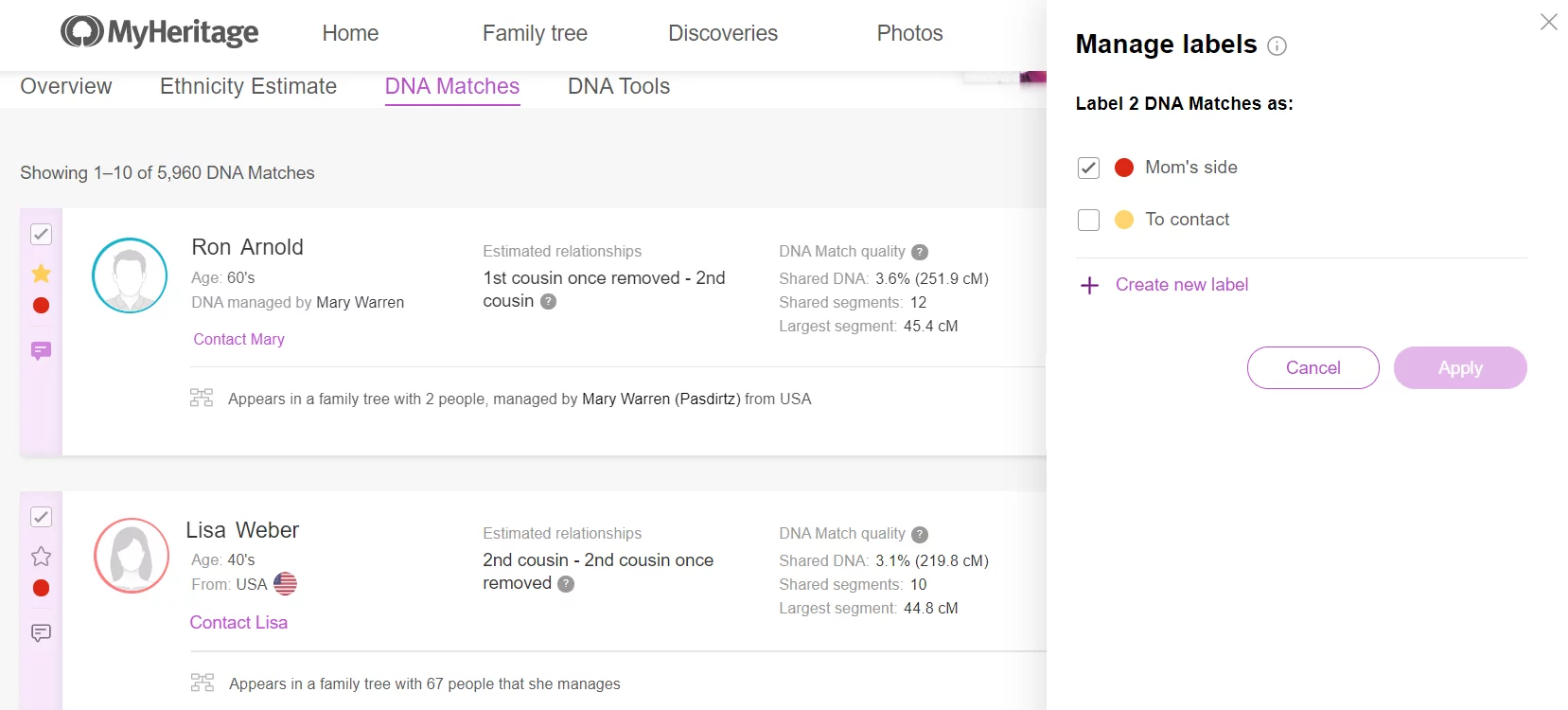
For example, you can create labels for:
- Your maternal or paternal side
- A particular grandparent’s branch
- A surname or ancestral location
- Matches you want to contact
- Matches you have already reviewed
- An unidentified group you are still investigating
You can assign more than one label to the same person and filter your match list by label. This makes it easier to pause an investigation and return to it later without retracing all your steps.
If you do not yet know where a match belongs, you can simply mark the match as a favorite or create a label such as “Review later.” You do not need to solve every relationship before organizing your research.
Look for groups of matches from the same family branch
When individual matches are difficult to place, examining them as a group can reveal patterns that are less visible one match at a time.
Generate AutoClusters
AutoClusters, available under DNA Tools, groups DNA Matches who also match one another. Each color-coded cluster may represent a particular family branch or group of people who descend from the same ancestor or ancestral couple.

Start with a cluster containing at least one match you recognize. If you know that person is connected through your paternal grandmother, for example, other people in the same cluster may also belong to that side of the family.
Next, compare the family trees, surnames, and ancestral places of the people within the cluster. Repeated names or locations may point toward the common connection.
Clusters are research clues, not definitive assignments. A person may be related to you in more than one way, and populations with a history of endogamy can produce more complex patterns.
Compare shared segments in the Chromosome Browser
The Chromosome Browser, also found under DNA Tools, shows where you and your DNA Matches share genetic segments. You can compare your DNA with up to seven matches at once.
If several people match you on the same area of the same chromosome and also match one another, the shared segment may have been inherited from a common ancestor. This process, known as triangulation, can help associate a DNA segment with a particular family line.

Triangulation is most useful when combined with documentary research. A shared segment can support a proposed connection, but you still need family tree information and historical evidence to identify the ancestor from whom it was inherited.
Add what you learn to your family tree
DNA evidence becomes more useful when it is connected to a well-researched family tree. Add confirmed relatives, names, dates, and places as you learn more, but avoid adding an entire branch based only on another user’s family tree or a suggested relationship.
Instead, treat information from DNA Matches as a set of leads. Look for birth, marriage, death, census, immigration, newspaper, and other historical records that can confirm the relationships involved.
A productive research cycle may look like this:
- Identify a promising DNA Match.
- Review shared surnames, places, family trees, and shared matches.
- Form a hypothesis about the connection.
- Search for records that support or contradict that hypothesis.
- Add the relationship to your family tree only when the evidence is strong enough.
- Use the expanded family tree to generate additional Smart Matches™, Record Matches, and DNA relationship theories.
Your DNA results and family tree strengthen one another. The family tree gives your matches context, while your matches may help you find branches and relatives that were missing from the family tree.
Explore your more distant paternal and ancient origins
Not every part of your DNA results is designed to solve a recent genealogical question. MyHeritage also offers features that place your DNA in a much broader historical context.
Go back thousands of years with Ancient Origins
Ancient Origins compares your DNA with ancient populations and DNA samples recovered from archaeological sites. Its reports can show your genetic connections to populations from different historical eras, going back up to 10,000 years.
You can explore breakdowns by historical period, populations genetically similar to you, migration maps, ancient DNA samples, and your genetic distance from notable individuals whose DNA has been analyzed.
Ancient Origins is separate from your Ethnicity Estimate. The Ethnicity Estimate focuses on your more recent ethnic and geographic origins, while Ancient Origins examines connections much further back in human history.
Trace your direct paternal line with Y-DNA
Biological males can generate Y-DNA results on MyHeritage to explore their direct paternal line: the line from father to son across generations.
Your results identify your Y haplogroup, which represents your branch on the human paternal family tree. You can explore its ancient migration path, where it appears in the world today, and ancient or notable individuals who share the same paternal lineage.
In most cases, existing male MyHeritage DNA customers can generate these results from their current DNA data without taking another test. Y-DNA results require a Complete or Omni plan.
Women can explore a paternal line by asking a male relative from that line to take a DNA test. The relative you choose depends on the line you want to investigate. For example, a father or brother can provide information about your father’s paternal line, while a maternal uncle can represent your maternal grandfather’s paternal line.
Discover how DNA may influence your traits
MyHeritage DNA Traits offers 40 personalized reports across five categories: Personality, Nutrition, Fitness, Lifestyle, and Cognition.
These reports explore genetic tendencies associated with characteristics such as taste perception, sleep habits, fitness, memory, and risk-taking. Because traits are influenced by both genetics and environmental factors, the reports describe tendencies rather than certainties.
Keep in mind that DNA Traits reports are intended for informational and recreational purposes. They do not diagnose medical conditions or replace professional medical advice.
FAQs about using MyHeritage DNA results
What should I look at first after receiving my DNA results?
Most begin with their Ethnicity Estimate and Genetic Groups to explore their ancestral origins, but if your primary goal is genetic genealogy, you may prefer to go straight to your DNA Matches. Start with the closest matches who you don’t recognize. These are often the easiest to place in your family tree and may help you understand more distant matches later.
How often does MyHeritage update ethnicity estimates?
MyHeritage updates its ethnicity models periodically as its reference populations, algorithms, and scientific methods improve. Because ethnicity results are estimates, your percentages or assigned ethnicities may change when an updated model becomes available.
How do I know whether a small DNA Match is genuine?
A small amount of shared DNA is generally more difficult to interpret than a larger match. Examine the size of the longest segment, shared matches, family trees, surnames, geographic origins, and whether the match shares the same segment with known relatives. Avoid drawing a conclusion from the number of shared centimorgans alone.
Can I download my raw DNA data from MyHeritage?
Yes. You can download the raw DNA data associated with a kit you manage from the MyHeritage website. Store the file securely because it contains sensitive genetic information. Before uploading it to another service, review that service’s privacy policy and data-use terms.
Does MyHeritage provide Y-DNA results?
Yes. Biological males with eligible DNA data on MyHeritage can generate Y-DNA results showing their Y haplogroup and information about their direct paternal lineage. These results are available with a Complete or Omni plan. A separate advanced Y-DNA test is available through FamilyTreeDNA for users who want a higher-resolution haplogroup and more detailed analysis.
Can DNA results prove that someone is a particular relative?
DNA can provide strong evidence for a biological relationship, especially when larger amounts of DNA are shared, but several relationships may be genetically similar. Family trees, ages, historical records, shared matches, and other evidence are often needed to determine the exact connection.